---
marp: true
theme: gaia
paginate: true
backgroundColor: #fff
header: "Web Engineering – DHBW Stuttgart"
footer: "Michael Czechowski – SoSe 2026"
title: Web Engineering
---

# Web Engineering
**DHBW Stuttgart** · Informatik / Wirtschaftsinformatik
**Sommersemester 2026**
---
# Willkommen!
## 1. Sitzung: 08.05.2026
---
# Über mich
**Michael Werner Czechowski**
- Systems and Platform Engineer
- Schwerpunkte:
- Web-Technologien, Barriere-Armut, Open Source
- Hintergrund:
- Philosophie (Uni Stuttgart)
- Wirtschaftsinformatik (Leibniz-FH Hannover)
- Honorardozent (DHBW Stuttgart, HdM Stuttgart, Leibniz-FH)
- Kontakt: michael.czechowski@lehre.dhbw-stuttgart.de
---
# Vorlesungsplan
| Sitzung | Datum | Thema |
|---------|-------|-------|
| 1 | 08.05. | Intro, Projektgruppen, Internet 101 |
| 2 | 15.05. | HTML und CSS (Frameworks) |
| 3 | 22.05. | JS (Frameworks) und npm |
| 4 | 29.05. | nodeJS: Scripting, Running and Building |
| 5 | 05.06. | Express API, CRUD und "Middlewares" |
| 6 | 12.06. | **Projektwerkstattbericht** |
| 7 | 19.06. | Testing (unit, integration, end-to-end) |
| 8 | 26.06. | TypeScript |
| 9 | 03.07. | Docker, Proxies and DBs |
| 10 | 10.07. | Wrap-up & Projektsupport |
| 11 | 17.07. | **Präsentation** |
---
# Prüfungsleistung – Übersicht
Eigenes Projekt: **Web-App** ODER **Backend** (API/CLI — Command-Line Interface).
**Grundanforderungen (75 Punkte)**
| Punkte | Bereich |
|--------|---------|
| 20 | Idee, Konzeption, Planung |
| 5 | Plattformunabhängigkeit |
| 25 | Clean Code (KISS, SOLID, DI, Testing, Error Handling) |
| 15 | Präsentation |
| 10 | Dokumentation |
**Zusatzpunkte (max. 10):** TypeScript, Docker, Dev/Prod-Parity, `.env`, npm-Publish, Domain, HTTPS, Responsive Design.
---
# Prüfungsleistung – Idee & Konzeption (20 P.)
- "Powerpoint"-Präsentation + Folien
- Aussagekräftiger Arbeitstitel + Beschreibung
- **Elevator Pitch** (max. 1 Min.)
- Repo-Link (GitHub / GitLab / Codeberg / BitBucket)
- **Logs**: wie hat sich Projekt verändert vs. Ursprungsidee?
- Schematischer Projektaufbau (UML o. Ä.)
---
# Prüfungsleistung – Clean Code (25 P.)
- `README.md` (clone, start, contribute)
- **KISS** – Keep It Simple, Stupid
- **SOLID:**
- **S**ingle Responsibility Principle
- **O**pen/Closed Principle
- **L**iskov Substitution Principle
- **I**nterface Segregation Principle
- **D**ependency Inversion Principle
- **DI** – Dependency Injection
- **Testing-Pyramide** (Unit, Integration, E2E)
- **Exception/Error Handling**
---
# Prüfungsleistung – Abgabe & Termine
- **Code-Upload:** bis 27.07.
- **Präsentation:** 17.07. (Gruppen, ~10 Min.)
Details: https://git.dailysh.it/DHBW/pruefungsleistung
---
# Internet 101 – Zeitleiste
| Jahr | Ereignis |
|------|----------|
| 1966 | ARPANET |
| 1969 | RFCs |
| 1986 | IETF |
| 1992 | Internet Society |
| 1974 | TCP/IP und HTTP(S) |
| 1987 | Domain Names und DNS |
| 1993 | "Erster" Browser: Mosaic |
| 1994 | W3C (HTML, XML, CSS, SVG, WCAG etc.) |
| 1995 | ECMAScript (JS) |
| 2006/08 | V8 JS Runtime Engine |
| Heute | 1,3 Mio. km Unterseekabel |
---
---
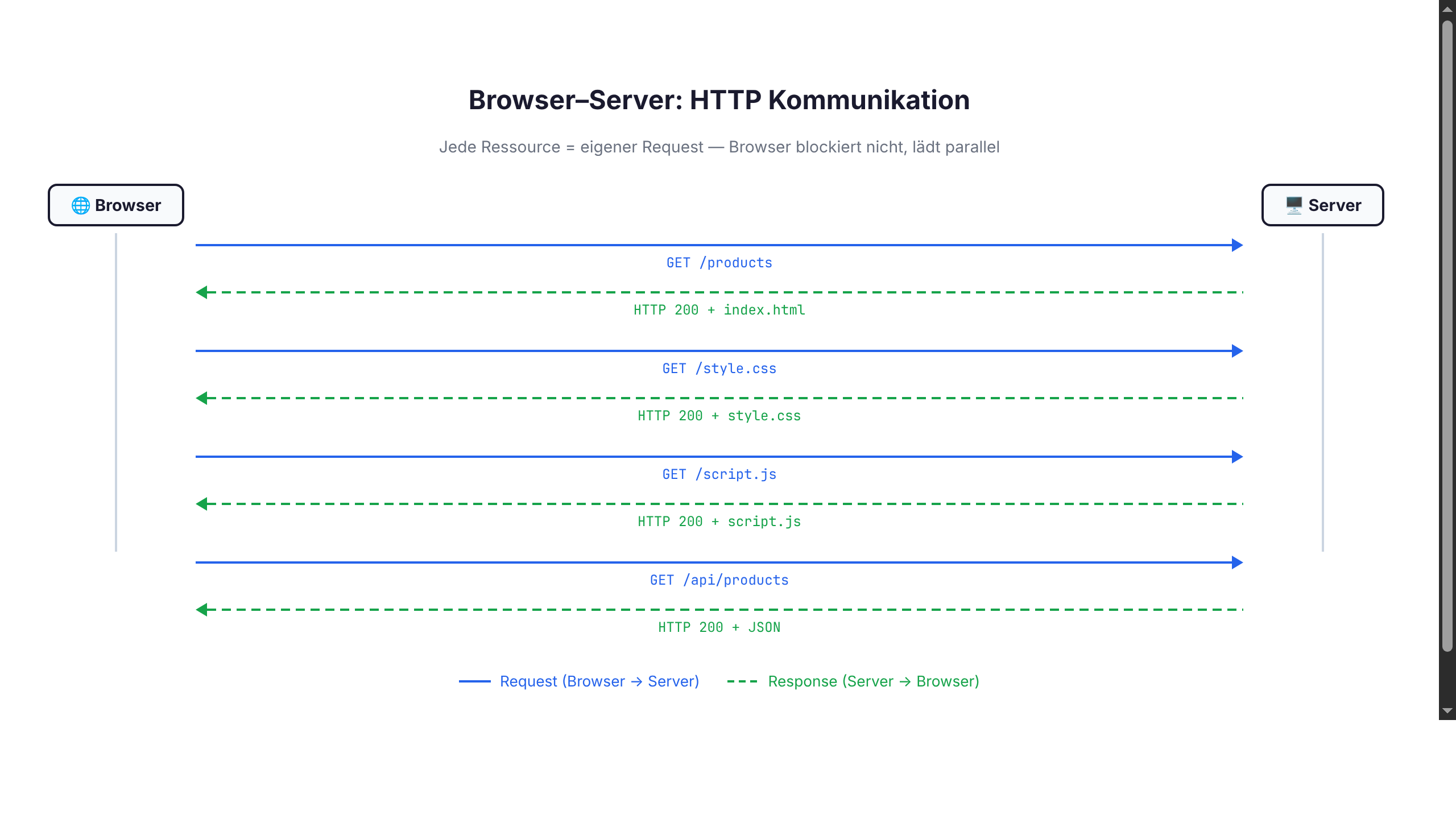
# HTTP – Hypertext Transfer Protocol
**Request:**
```
GET /products HTTP/1.1
Host: localhost:8080
```
**Response:**
```
HTTP/1.1 200 OK
Content-Type: application/json
[{"id": 1, "name": "Produkt A"}, ...]
```
---
# Onboarding
## Tools, Runtimes, Workflows
---
# Werkzeuge & Betriebssystem
**Was du brauchst:**
- Terminal (zsh/bash/fish/pwsh)
- Editor (siehe folgende Folie)
- JavaScript-Runtime (Node.js / Bun / Deno)
- Browser mit DevTools (Chromium / Firefox / Safari)
- Git
**OS-Empfehlung:**
| OS | Status |
|----|--------|
| **macOS** | First-class, viele Tools "just work" |
| **Linux** | First-class, beste Server-Parität |
| **Windows + WSL2** | Empfohlen — Windows-CLI hat Edge Cases |
| **Windows nativ** (PowerShell) | Funktioniert, aber holpriger Pfad |
---
# Node.js installieren – macOS
Empfohlen: **LTS** (aktuell **Node.js 24** — Stand 2026).
Paketmanager: **[Homebrew](https://brew.sh)**
```bash
# Homebrew installieren (falls nicht vorhanden)
/bin/bash -c "$(curl -fsSL https://raw.githubusercontent.com/Homebrew/install/HEAD/install.sh)"
# Node.js LTS installieren
brew install node@24
# Version prüfen
node --version
npm --version
```
Alternative: Installer von [nodejs.org](https://nodejs.org)
---
# Node.js installieren – Linux
Empfohlen: **LTS** (aktuell **Node.js 24**).
**Debian / Ubuntu** ([NodeSource](https://github.com/nodesource/distributions)):
```bash
curl -fsSL https://deb.nodesource.com/setup_lts.x | sudo -E bash -
sudo apt install -y nodejs
```
**Arch / Manjaro:**
```bash
sudo pacman -S nodejs npm
```
**Fedora / RHEL:**
```bash
sudo dnf module install nodejs:24/common
```
→ Distro-Pakete sind oft **veraltet**. Versionsmanager (folgende Folie) bevorzugen.
---
# Node.js installieren – Windows
Empfohlen: **LTS** (aktuell **Node.js 24**).
**Option 1: winget** (empfohlen, Win 10/11):
```powershell
winget install OpenJS.NodeJS.LTS
```
**Option 2: Chocolatey** ([chocolatey.org](https://chocolatey.org)):
```powershell
choco install nodejs-lts
```
**Option 3: Scoop** ([scoop.sh](https://scoop.sh)):
```powershell
scoop install nodejs-lts
```
**Option 4:** Installer von [nodejs.org](https://nodejs.org)
→ **Empfehlung:** WSL2 + Linux-Workflow nutzen.
---
# Direkt-Install: Nachteil
Egal welcher Weg — System-Install kennt nur **eine** Node-Version gleichzeitig.
Verschiedene Projekte → verschiedene Node-Versionen → **Versionsmanager**.
---
# Node-Versionsmanager
Verschiedene Projekte brauchen oft verschiedene Node-Versionen. **Lösung:** Versionsmanager.
| Tool | Sprache | Geschwindigkeit | Plattform |
|------|---------|-----------------|-----------|
| **nvm** | Bash | langsam (Shell-Funktion) | macOS, Linux |
| **fnm** | Rust | sehr schnell | macOS, Linux, Windows |
| **asdf** | Bash | mittel, multi-language | macOS, Linux |
| **volta** | Rust | schnell, pinning per `package.json` | alle |
```bash
# fnm
curl -fsSL https://fnm.vercel.app/install | bash
fnm install --lts # aktuell Node 24
fnm use lts-latest
# .nvmrc / .node-version automatisch
echo "lts/*" > .nvmrc
fnm use # liest .nvmrc
```
---
# Alternative Runtimes
| Runtime | Erschienen | Engine | USP |
|---------|------------|--------|-----|
| **Node.js** | 2009 | V8 (C++) | Standard, größtes Ökosystem |
| **Deno** | 2020 | V8 (Rust) | Sicherheit, TypeScript nativ, Std-Lib |
| **Bun** | 2022 | JavaScriptCore (Zig) | Geschwindigkeit, all-in-one |
```bash
# Deno
curl -fsSL https://deno.land/install.sh | sh
deno run main.ts
# Bun
curl -fsSL https://bun.sh/install | bash
bun install
bun run dev
```
→ Im Kurs primär **Node.js**. Du darfst gerne Bun/Deno nutzen.
---
# Editor
- **VS Code** (empfohlen) — kostenlos, große Plugin-Auswahl
- **JetBrains WebStorm** — sehr mächtig, kostenpflichtig
- kostenlos für Studierende via [JetBrains Education](https://www.jetbrains.com/community/education/#students)
- **Neovim / Helix** — für CLI-Profis
- **Zed** — modern, schnell
---
# Browser DevTools
Chromium / Firefox / Safari — `F12` oder `Cmd+Opt+I`
Chromium = Open-Source-Basis von Chrome, Edge, Brave, Opera, Vivaldi etc.
**Wichtigste Panels:**
- **Network** — HTTP-Requests, Responses, Timing
- **Console** — `console.log`, JS-Errors, REPL
- **Elements** — DOM-Inspektor, Live-CSS-Editor
- **Sources** — Debugger, Breakpoints, Source-Maps
- **Performance** — Profiling, Frame-Rate, FPS
- **Application** — LocalStorage, Cookies, Service Workers
---
# HTTP-Clients
- **Bruno** ([usebruno.com](https://usebruno.com)) — open source, git-friendly
- **Hoppscotch** ([hoppscotch.io](https://hoppscotch.io)) — open source, browser-basiert (vormals Postwoman)
- **Insomnia** / **Postman** — etabliert, freemium
- **curl** / **httpie** — CLI (Command-Line Interface, scriptbar)
---
# Git Setup & Workflow
**Einmalige Konfiguration:**
```bash
git config --global user.name "Dein Name"
git config --global user.email "du@example.com"
git config --global init.defaultBranch main
git config --global pull.rebase true
```
**SSH-Key für GitHub/GitLab:**
```bash
ssh-keygen -t ed25519 -C "du@example.com"
cat ~/.ssh/id_ed25519.pub # → in GitHub-Settings einfügen
```
**Tägliche Befehle:**
```bash
git status # was hat sich geändert?
git add # für Commit vormerken
git commit -m "feat: ..." # Conventional Commits
git push # hochladen
git pull --rebase # neueste Änderungen holen
```
---
# Projekt-Skeleton
```bash
mkdir mein-projekt && cd mein-projekt
git init
npm init -y # erzeugt package.json
echo "node_modules" > .gitignore
echo ".env" >> .gitignore
npm install express
```
**`package.json` minimal:**
```json
{
"name": "mein-projekt",
"version": "0.1.0",
"type": "module",
"scripts": {
"start": "node index.js",
"dev": "node --watch index.js"
}
}
```
`.env` für Secrets (nie committen!), `.env.example` mit Dummy-Werten committen.
---
# HTML – Hypertext Markup Language
---
# Was ist HTML? (1/2)
**H**yper**T**ext **M**arkup **L**anguage
- **Keine** Programmiersprache
- Am ehesten eine Formattierungssprache
- Beschreibt **Struktur und Aufbau** einer Webseite
```html
Das ist ein Absatz.
```
Erfunden 1989 von Tim Berners-Lee. Aktuelle Version: HTML5 (seit 2014).
---
# Was ist HTML? (2/2)
- Mit HTML werden **HTML-Dokumente** beschrieben (`index.html`)
- Ein HTML-Dokument beschreibt das **Document Object Model (DOM)**
- Der DOM ist eine **hierarchische Baumstruktur** (Eltern, Kinder, Geschwister)
- *parent* nodes / elements
- *child* nodes / elements
- *sibling* nodes / elements
In HTML sprechen wir von **Elementen**, in JavaScript eher von **Nodes**.
---
# HTML-Anatomie (1/2)
Formattierungssprache mit strenger Syntax:
```
...
```
- Öffnende und schließende Tags müssen identisch sein
- Schließendes Tag hat ein `/` nach der Spitzklammer
---
# HTML-Anatomie (2/2)
Wir unterscheiden **umschließende** und **selbst-schließende** Tags.
**Umschließend:**
- ` ... ` – fett-gedruckter Text (inline)
- ` ... ` – Hyperlink
- ` ... ` – sichtbarer Teil eines HTML-Dokuments
- ` ... ` – Aufklapp-Text / Akkordion
**Selbst-schließend:**
- `![]() ` – Bild, Vektorgrafik
- `` – Eingabefeld
- `` – Metadaten
---
# Darstellungsebene und Metadaten
```html
METADATEN
DARSTELLUNGSEBENE
```
Ein HTML-Dokument besteht aus zwei Teilen:
- ` ... ` – Metadaten für Browser, Suchmaschinen, Social Sharing
- ` ... ` – darzustellender Inhalt, Text, Formulare
---
# HTML Metadaten
```html
DHBW Stuttgart
...
```
*Webseiten besuchen nicht nur Menschen, sondern auch Suchmaschinen, Bots, Screen-Reader. Metadaten helfen beim "Verstehen" der Inhalte.*
---
# HTML Metadaten – Vertiefung
| Tag | Funktion |
|-----|----------|
| `` | Browser-Tab, Suchergebnis-Titel |
| `<meta charset>` | Zeichenkodierung (Umlaute!) |
| `<meta viewport>` | Mobile Darstellung |
| `<meta description>` | Suchergebnis-Snippet (max 160 Zeichen) |
**Open Graph** (Social-Media-Vorschau):
```html
<meta property="og:title" content="Artikel-Titel">
<meta property="og:image" content="https://example.com/preview.jpg">
```
→ Wirkt auf Mastodon, LinkedIn, Signal, Slack, MS Teams ...
**SEO:** Google nutzt `<title>` + `<meta description>` für Ranking + Snippet.
---
# HTML-Tags und Attribute

```html
<body>
<p class="wichtig">Das ist ein wichtiger Absatz.</p>
<p>Das ist ein gewöhnlicher Absatz.</p>
</body>
```
| Teil | Bezeichnung |
|------|-------------|
| `<p>` | Opening Tag |
| `class="wichtig"` | Attribut |
| `Das ist ein wichtiger Absatz.` | Inhalt |
| `</p>` | Closing Tag |
---
# HTML-Tags und Attribute (selbst-schließend)
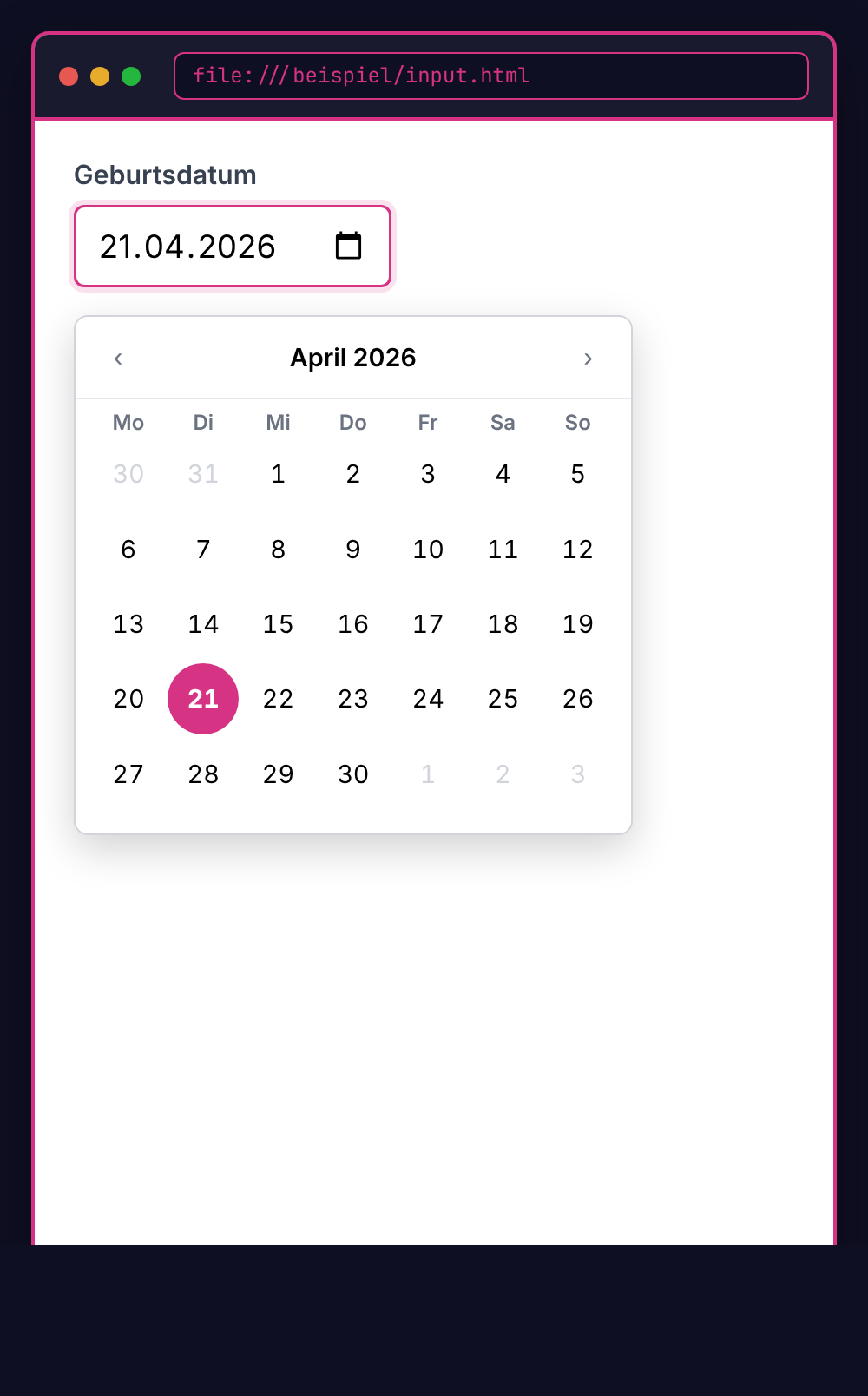
```html
Geburtsdatum <input type="date" />
```
| Teil | Bezeichnung |
|------|-------------|
| `<input ...` | Eingabefeld |
| `type="date"` | Attribut *type* mit Wert *date* |
| `... />` | Schließendes `/` im (öffnenden) Tag |
---
# Vollständiges Grundgerüst
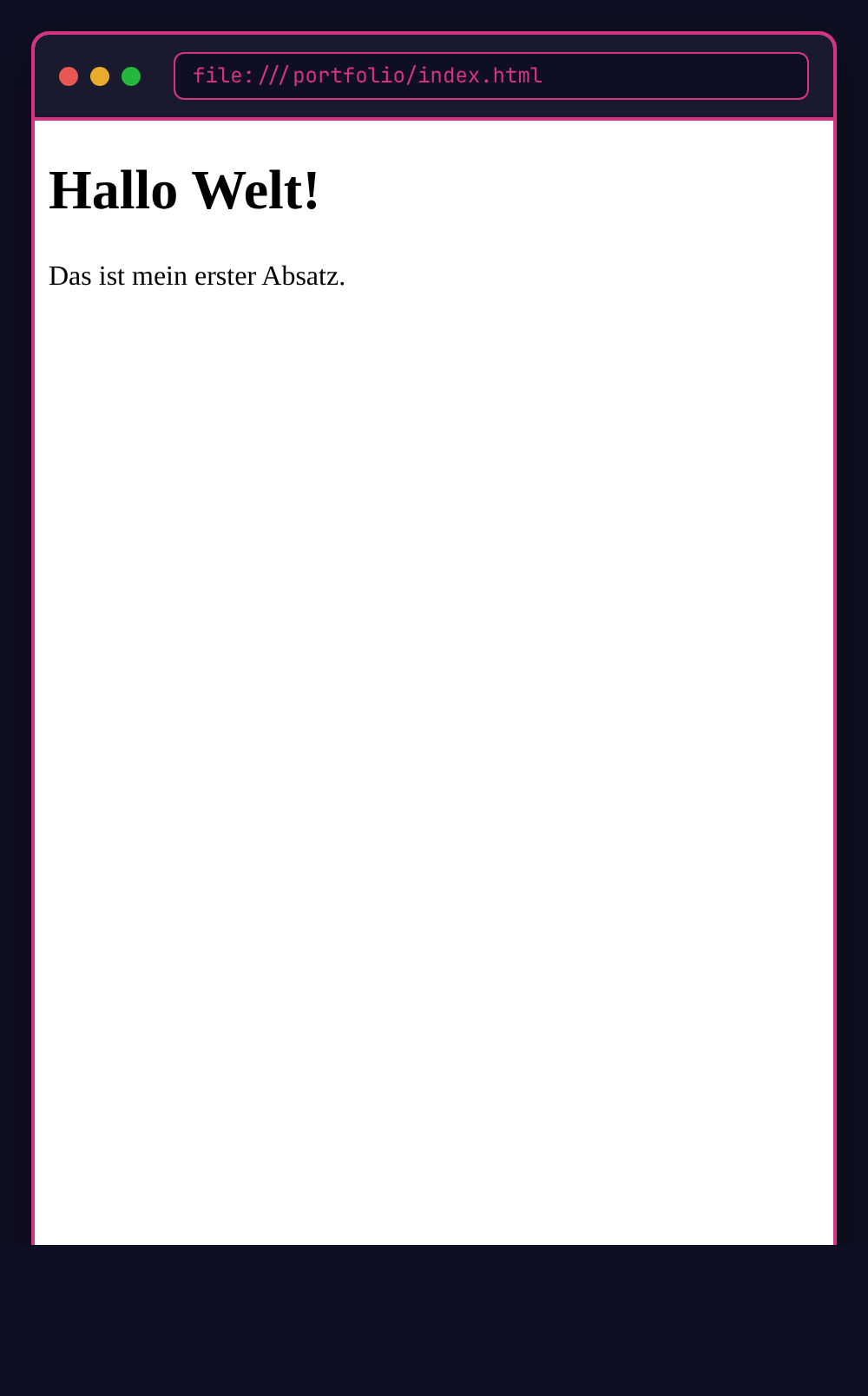
```html
<!DOCTYPE html>
<html lang="de">
<head>
<title>Portfolio von ...
` – Bild, Vektorgrafik
- `` – Eingabefeld
- `` – Metadaten
---
# Darstellungsebene und Metadaten
```html
METADATEN
DARSTELLUNGSEBENE
```
Ein HTML-Dokument besteht aus zwei Teilen:
- ` ... ` – Metadaten für Browser, Suchmaschinen, Social Sharing
- ` ... ` – darzustellender Inhalt, Text, Formulare
---
# HTML Metadaten
```html
DHBW Stuttgart
...
```
*Webseiten besuchen nicht nur Menschen, sondern auch Suchmaschinen, Bots, Screen-Reader. Metadaten helfen beim "Verstehen" der Inhalte.*
---
# HTML Metadaten – Vertiefung
| Tag | Funktion |
|-----|----------|
| `` | Browser-Tab, Suchergebnis-Titel |
| `<meta charset>` | Zeichenkodierung (Umlaute!) |
| `<meta viewport>` | Mobile Darstellung |
| `<meta description>` | Suchergebnis-Snippet (max 160 Zeichen) |
**Open Graph** (Social-Media-Vorschau):
```html
<meta property="og:title" content="Artikel-Titel">
<meta property="og:image" content="https://example.com/preview.jpg">
```
→ Wirkt auf Mastodon, LinkedIn, Signal, Slack, MS Teams ...
**SEO:** Google nutzt `<title>` + `<meta description>` für Ranking + Snippet.
---
# HTML-Tags und Attribute

```html
<body>
<p class="wichtig">Das ist ein wichtiger Absatz.</p>
<p>Das ist ein gewöhnlicher Absatz.</p>
</body>
```
| Teil | Bezeichnung |
|------|-------------|
| `<p>` | Opening Tag |
| `class="wichtig"` | Attribut |
| `Das ist ein wichtiger Absatz.` | Inhalt |
| `</p>` | Closing Tag |
---
# HTML-Tags und Attribute (selbst-schließend)

```html
Geburtsdatum <input type="date" />
```
| Teil | Bezeichnung |
|------|-------------|
| `<input ...` | Eingabefeld |
| `type="date"` | Attribut *type* mit Wert *date* |
| `... />` | Schließendes `/` im (öffnenden) Tag |
---
# Vollständiges Grundgerüst

```html
<!DOCTYPE html>
<html lang="de">
<head>
<title>Portfolio von ...
Hallo Welt!
Das ist mein erster Absatz.